MFA Fatigue Phishing Campaign

Account compromises typically occur due to phishing emails, credential compromise, a lack of multi-factor authentication (MFA), exploited vulnerabilities, and data breaches. The NJCCIC recently received a report of a compromised account due to MFA fatigue (or MFA prompt bombing) . In MFA fatigue attacks, threat actors obtain account credentials and attempt to log in multiple times, initiating many MFA authentication requests in an attempt to force their targets to approve them. They hope the target will be distracted and unintentionally provide access or eventually give in due to fatigue and approve one of the requests. Once a request is approved and threat actors gain unauthorized access to the account, they can enroll their own devices and accounts for MFA, change passwords, and lock out account owners. Depending on the account permissions, they can access internal systems, move laterally to other critical systems, and initiate subsequent malicious activity.
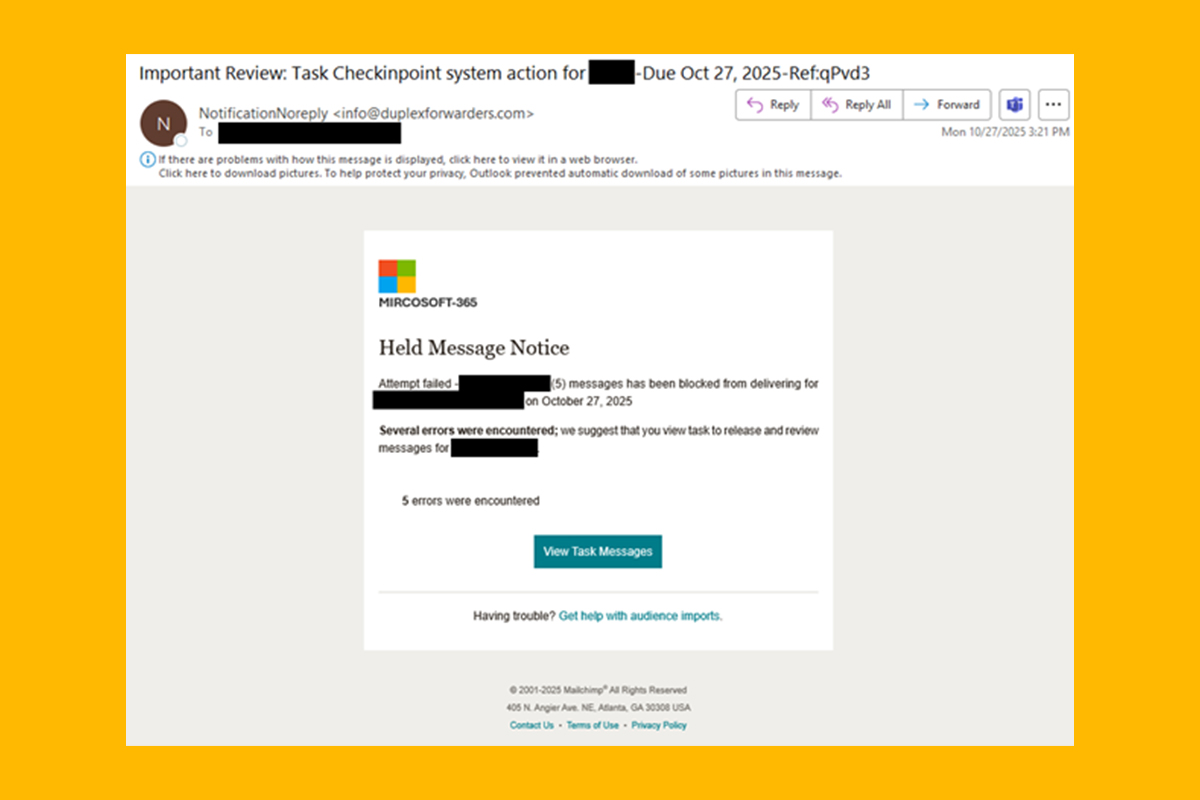
In the report, once threat actors compromised the account, they sent a “Mircosoft-365” phishing campaign to the victim’s contact list. The phishing email uses “Mircosoft-365” branding instead of the legitimate “Microsoft 365.” The email is not sent from a Microsoft domain, but appears to use the Mailchimp email marketing platform, as indicated at the bottom of the email. The email purports to be a “Held Message Notice” informing the target that a certain number of messages have been blocked from being delivered and to review and release these messages by clicking the “View Task Messages” button. If clicked, the target is redirected multiple times to a phishing page that harvests account credentials. Links used in this campaign include hxxps://d8yru9hbb[.]cc[.]rs6[.
Recommendations
- If suspicious MFA pop-up authentication requests are received, change the account password immediately to prevent further login attempts and MFA push notifications.
- For organizations, implement monitoring and warning mechanisms to detect suspicious MFA prompt activity. Limit the number of MFA authentication requests per user within a certain period of time, if this option is available. If thresholds are exceeded, temporarily lock the account and alert the domain administrator.
- Exercise caution with communications from known senders or legitimate platforms.
- Confirm requests from senders via contact information obtained from verified and official sources before taking action, such as clicking on links or opening attachments.
- Type official website URLs into browsers manually and only submit sensitive information on official websites.
- Keep systems and browsers up to date.
- Report malicious cyber activity to the NJCCIC and the FBI’s IC3.